LeanIX Synchronization
Instructions:
-
Open the WebModeller or the SystemAdministration
-
In the model overview, create a LeanIX folder under an IT system (folder):
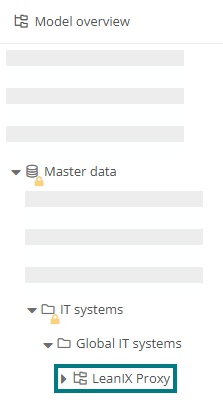
-
Open the properties of the LeanIX folder and configure it as follows:
Properties Description Configuration Applications The applications and interfaces that have already been synchronized from LeanIX to Aeneis are displayed here. Url Enter the URL of the LeanIX system here (example: https://de.leanix.net). Client Id You can leave this field empty, as the API token is used by default. Client secret
Enter the token of LeanIX here. You can create the token in two ways:
-
(Recommended) Create a technical user in the LeanIX Administration and assign a name, such as Aeneis.Integration. In this step, LeanIX automatically generates the client secret once, which you then enter here.
-
(Not recommended) Generate an API token for an existing user in LeanIX and enter it here.
Import user Here you can specify a user if the synchronization should not run via the administrator in Aeneis. Import language Enter the language abbreviation of the language for the synchronized objects here. Trigger (cron expression) Here you can store a trigger for an automated synchronization. Paper bin The objects that have been deleted or archived in LeanIX and deleted in Aeneis are displayed here. Exported processes Here you can reference process folders, process groups and processes whose child objects are to be transferred from Aeneis to LeanIX.
Hinweis: Objects that are stored in the Exported processes are not transferred themselves, only their children and referenced objects at child level.
Beispiel: If you want to export level-1-processes and their children to LeanIX, select the respective parent objects here, e.g. the process folders Management processes, Core processes and Support processes.
Beispiel: If you want to export selected level-1-processes, create the process folder To LeanIX transferred processes in the model overview, for example, where you reference the relevant level-1-processes. You then store this folder under Exported processes.
Export only released objects If you enable this option, only children and references of objects that have a version are exported.
Ausnahme: If a level-1-process is not versioned but a subordinate level-2-process has been released, the level-1-process is also exported to represent the parent-child relationship in LeanIX.
Export levels of the processes Enter here the number of levels to be considered when synchronizing processes from Aeneis to LeanIX.
Hinweis: References below the first transferred level are no longer output, but only main objects.
Hinweis: The value 3 is used by default.
Beispiel: Under Exported processes you have created a folder whose child processes are to be transferred to LeanIX only at the first and second levels. In this case, change the value to 2.
Proxy host You can optionally specifiy the hostname or IP address of the HTTP proxy here. If the proxy host and proxy port are configured, all outgoing token requests and GraphQL calls are routed through the proxy.
Proxy Port Specify the HTTP proxy port here.
Hinweis: The proxy is used only if both the proxy host and the proxy port are configured.
-
-
Save the settings
Result:
During the next synchronization triggered by the stored trigger, the corresponding objects are transferred from LeanIX to Aeneis or also from Aeneis to LeanIX.